
- Please select the card you wish to join
-
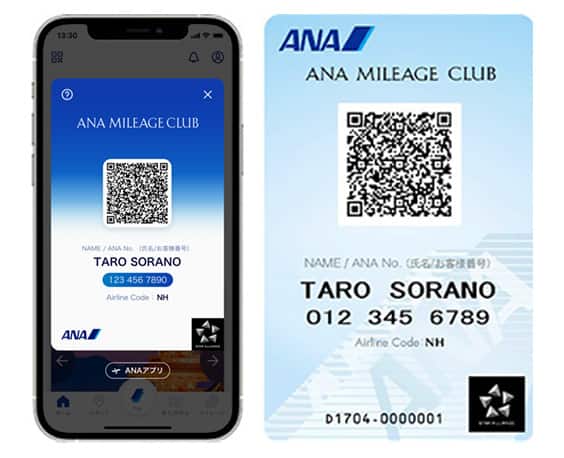
Get your digital card immediately
No enrollment or annual fees
ANA Mileage Club Card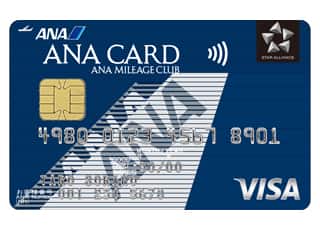
Earn more miles for your money
With credit function
ANA Card
For Customers Who Are Changing OSAIFU KEITAI Mobile Phones
For Customers Who Are Changing OSAIFU KEITAI Mobile Phones
After changing to a new OSAIFU-KEITAI® device, registration procedures for the Keitai de Edy Miles service must be completed again or else miles cannot be accrued when using Rakuten Edy on the new device. Please follow the procedures below.
Changing to a Smartphone
Please follow the instructions below on ANA website (smartphone site) when changing to an Android device (smartphone) with OSAIFU-KEITAI functionality. ANA Mileage Club membership number registration for SKiP Service as well as Keitai de Edy Miles registration are required.
1. ANA Mileage Club membership number registration (SKiP Service Registration).
Step 1

After logging in, go to My Menu and select View or Update Your Profile, then select Other Information to expand the menu in the Support section. (If you have downloaded the ANA app, select ANA Website in the ANA app menu and then proceed to My Menu.)
Step 2

Select SKiP Service and Rakuten Edy Registration, then select ANA Mileage Club Membership Number Registration (SKiP Service Registration).
Step 3
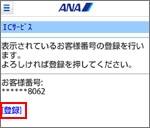
Verify the last 4 digits of the ANA Mileage Club membership number, then tap Register.
Step 4
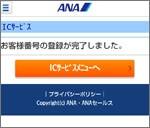
Procedures completed.
Click here for information on how to change or delete a registered ANA Mileage Club membership number from SKiP Service.
2. Keitai de Edy Miles registration.
-
*
Customers who only wish to use SKiP Service are not required to register for Keitai de Edy Miles.
■Pattern A: Customers Who Have Not Completed Initial Setup for Using Rakuten Edy
Step 1

After logging in, go to My Menu and select View or Update Your Profile, then select Other Information to expand the menu in the Support section.
Step 2

Select SKiP Service and Rakuten Registration, then select Keitai de Edy Miles Registration.
Step 3
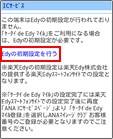
A notification will be displayed if initial setup is required, and you will need to proceed to a Rakuten Edy, Inc. website.
Step 4

Go to the Rakuten Edy, Inc. smartphone website and complete the initial setup for using Rakuten Edy.
Step 5

After completing initial setup for using Rakuten Edy, select Keitai de Edy Registration from the NFC-related Services screen again and register you ANA Mileage Club membership number (follow the steps for Pattern B below).
■Pattern B: Customers Who Have Completed Initial Setup for Using Rakuten Edy
-
*
If another Rakuten Edy Number had previously been registered, following the steps below will automatically delete that Rakuten Edy Number.
Step 1

After logging in, go to My Menu and select View or Update Your Profile, then select Other Information to expand the menu in the Support section.
Step 2

Select SKiP Service and Rakuten Edy Registration, then select Keitai de Edy Miles Registration.
Step 3
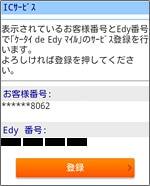
Verify the last 4 digits of the ANA Mileage Club membership number, then tap Register.
Step 4

Procedures completed.
■How to Delete Keitai de Edy Miles Registration
Step 1
After logging in, go to My Menu and select View or Update Your Profile, then select Other Information to expand the menu in the Support section.
Step 2
Select SKiP Service and Rakuten Edy Registration, then select Keitai de Edy Miles Registration.
Step 3
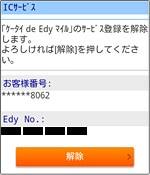
Verify the last 4 digits of the ANA Mileage Club membership number, then tap Delete.
Step 4
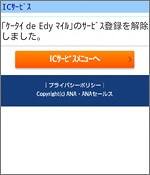
Procedures completed.
Other Frequently Asked Questions
Are there any unused Rakuten Edy on the old OSAIFU-KEITAI device?
Customers who are already using OSAIFU-KEITAI devices are able to transfer their Rakuten Edy account balances to their new devices when changing mobile phones. Please request the Rakuten Edy Deposit Service from the old device. See here for details.
Customers Who Wish to Redeem Rakuten Edy E-money Awards from Their New OSAIFU-KEITAI Devices
Customers can apply for and collect Rakuten Edy E-money Awards from 3 days after completing Keitai de Edy Miles registration.
Frequently Asked Questions Related to OSAIFU-KEITAI
-
There was a problem with my OSAIFU-KEITAI device, and I had to change my Rakuten Edy Number as well. Are there any procedures I need to complete?
-
If I port my mobile phone number through mobile number portability (MNP), will my Rakuten Edy Number change?
Related Tags






Member Login
Information for Members Logging In
- Before proceeding to log in, please be sure to read and accept the section on the purpose of using personal information in the ANA Privacy Policy.
- Points to note when using your AMC account.
Auto-Login with Cookies
- However, you will need to re-enter your password as a form of verification when making reservations, requesting awards, registering/revising personal information, and using other members-only functions.
-
The confirmation screen will reappear after closing all browser windows even if you checked "Do not show this screen again."
Entry of One-Time Password
If you have not received your one-time password
If your one-time password does not come through, please check your settings for receiving it and then re-send it.
If you do not do anything on the screen for a certain amount of time, you will have to request another one-time password.
Select your desired destination email address.
Do you really want to log out?
- If you click "Log Out," you will be logged out even if you have selected "Save Login Status."
- Close all open browser windows if you want to quit your session without logging out.
-
The confirmation screen will reappear after closing all browser windows even if you checked "Do not show this screen again."

ANA Biz is a business travel arrangement service.

-
MILES
-
ANA SKY COINS
-
Premium Point / Point on ANA /
-
Reservations
-
MILES
-
MILES
-
Login
-
Support